Sottolineature pescate qua e la quando capita

venerdì 19 gennaio 2024

How SSPM Simplifies Your SOC2 SaaS Security Posture Audit


An accountant and a security expert walk into a bar… SOC2 is no joke.

Whether you're a publicly held or private company, you are probably considering going through a Service Organization Controls (SOC) audit. For publicly held companies, these reports are required by the Securities and Exchange Commission (SEC) and executed by a Certified Public Accountant (CPA). However, customers often ask for SOC2 reports as part of their vendor due diligence process.

Out of the three types of SOC reports, SOC2 is the standard to successfully pass regulatory requirements and signals high security and resilience within the organization — and is based on the American Institute of Certified Public Accountants (AICPA) attestation requirements. The purpose of this report is to evaluate an organization's information systems relevant to security, availability, processing integrity, confidentiality, and privacy — over a period of time (roughly six to twelve months).

As part of a SOC2 audit, it is necessary to conduct security checks across the company's SaaS stack that will look for misconfigured settings such as detection and monitoring to ensure continued effectiveness of information security controls and prevent unauthorized/ inappropriate access to physical and digital assets and locations.

If you're beginning or on a SOC2 audit journey, then an SSPM (SaaS Security Posture Management) solution can streamline the process and shorten the time it takes to pass a SOC2 audit successfully, fully covering your SaaS Security posture.

Learn how to streamline your organization's SOC2 compliance

What are the AICPA Trust Services Criteria (TSC)?

When external auditors engage in a SOC 2 audit, they need to compare what you're doing to a long list of established requirements from AICPA TSC. The "Common Controls" fall into five groups:

  • Security - Includes sub controls of the Logical and Physical Access (CC6)
  • Availability - Includes sub controls of the System Operations (CC7)
    • Processing integrity: Includes sub controls of the System Operations (CC7)
    • Confidentiality: Includes sub controls of the Logical and Physical Access (CC6)
    • Privacy - Includes sub controls of the Monitoring Activities (CC4)

      Within each common control are a set of sub controls that turn the overarching standard into actionable tasks.

      Passing a SOC 2 audit takes a lot of time, effort, and documentation. During a SOC2 audit, you not only need to show that your controls work during the audit period, but you also need to show that you have the ability to continuously monitor your security.

      Going through the entire TSC framework is too long for a blog post. However, a quick look into a couple of controls of Logical and Physical Access (CC6) and System Operations (CC7) gives you an idea of what some of the controls look like and how you can utilize an SSPM to ease the SOC2 audit.

      Get a 15-minute demo of how an SSPM can help your SOC 2 TSC audit

      Logical and Physical Access Controls

      This section sets out the types of controls needed to prevent unauthorized or inappropriate access to physical and digital assets and locations. Managing user access permissions, authentication, and authorization across the SaaS estate poses many challenges. In fact, as you look to secure your cloud apps, the distributed nature of users and managing the different access policies becomes increasingly challenging.

      Under CC6.1 control, entities need to:

      • Identify, classify, and manage information assets
      • Restrict & manage user access
      • Consider network segmentation
      • Register, authorize, and document new infrastructure
      • Supplement security by encrypting data-at-rest
      • Protect encryption keys

      Example

      The department that utilizes a SaaS app is often the one that purchases and implements it. Marketing might implement a SaaS solution for monitoring leads while sales implements the CRM. Meanwhile, each application has its own set of access capabilities and configurations. However, these SaaS owners may not be trained in security or able to continuously monitor the app's security settings so the security team loses visibility. At the same time, the security team may not know the inner workings of the SaaS like the owner so they may not understand more complex cases which could lead to a security breach.

      An SSPM solution, maps out all the user permissions, encryption, certificates and all security configurations available for each SaaS app. In addition to the visibility, the SSPM solution helps correct any misconfiguration in these areas, taking into consideration each SaaS app's unique features and usability.

      In CC.6.2 control, entities need to:

      • Create asset access credentiations based on authorization from the system's asset owner or authorized custodian
      • Establish processes for removing credential access when the user no longer requires access
      • Periodically review access for unnecessary and inappropriate individuals with credentials

      Example

      Permission drifts occur when a user has certain permissions as part of a group membership, but then gets assigned a specific permission that is more privileged than what the group has. Over time many users get extra permissions. This undermines the idea of provisioning using groups.

      Classic deprovisioning issues, an SSPM solution can spot inactive users and help organizations to quickly remediate, or at the very least, alert the security team to the issue.

      Under CC.6.3 control, entities need to:

      • Establish processes for creating, modifying or removing access to protected information and assets
      • Use role-based access controls (RBAC)
      • Periodically review access roles and access rules

      Example

      You might be managing 50,000 users across five SaaS applications, meaning the security team needs to manage a total of 250,000 identities. Meanwhile, each SaaS has a different way to define identities, view them, and secure identities. Adding to the risk, SaaS applications don't always integrate with each other which means users can find themselves with different privileges across different systems. This then leads to unnecessary privileges that can create a potential security risk.

      An SSPM solution allows visibility into user privileges and sensitive permission across all connected SaaS apps, highlighting the deviation from permission groups and profiles.

      System Operations

      This section focuses on detection and monitoring to ensure continued effectiveness of information security controls across systems and networks, including SaaS apps. The diversity of SaaS apps and potential for misconfigurations makes meeting these requirements challenging.

      In CC7.1 control, entities need to:

      • Define configuration standards
      • Monitor infrastructure and software for noncompliance with standards
      • Establish change-detection mechanisms to aler personnel to unauthorized modification for critical system, configuration, or content files
      • Establish procedures for detecting the introduction of known or unknown components
      • Conduct periodic vulnerability scans to detect potential vulnerabilities or misconfigurations

      It is unrealistic to expect from the security team to define a "configuration standard" that complies with SOC2 without comparing against a built-in knowledge base of all relevant SaaS misconfigurations and to continuously comply with SOC2 without using an SSPM solution.

      Get a 15-minute demo to see how an SSPM solution automates your SaaS security posture for SOC2 and other standards.

      Related posts

      1. Hacker Tools Software
      2. Hack Tools For Pc
      3. Underground Hacker Sites
      4. What Are Hacking Tools
      5. Pentest Tools Android
      6. Top Pentest Tools
      7. Best Hacking Tools 2020
      8. Beginner Hacker Tools
      9. Hacker Tool Kit
      10. Hacker Tools Linux
      11. Tools For Hacker
      12. Hacking Tools For Games
      13. Hack Tools 2019
      14. Hack Tools 2019
      15. Hackrf Tools
      16. Hacker Tools For Pc
      17. Hacking Tools Usb
      18. Pentest Tools Bluekeep
      19. Blackhat Hacker Tools
      20. Pentest Tools Website Vulnerability
      21. Hacking Tools Pc
      22. Hacking Tools Pc
      23. Pentest Tools Bluekeep
      24. Pentest Tools Apk
      25. Hacking Tools Mac
      26. Pentest Tools Open Source
      27. Pentest Tools Online
      28. What Are Hacking Tools
      29. Hacking Tools Windows 10
      30. Hacker Tools List
      31. Hacking Tools And Software
      32. Hack Tools
      33. Github Hacking Tools
      34. Hacker Techniques Tools And Incident Handling
      35. Hacker Techniques Tools And Incident Handling
      36. Hacking Tools Windows 10
      37. Hacking Tools Usb
      38. Hack Website Online Tool
      39. Pentest Tools Kali Linux
      40. Pentest Tools For Windows
      41. Hacking Tools For Games
      42. Hacking Tools For Windows Free Download
      43. Pentest Box Tools Download
      44. Beginner Hacker Tools
      45. Best Hacking Tools 2019
      46. How To Make Hacking Tools
      47. Computer Hacker
      48. Pentest Tools Github
      49. Pentest Box Tools Download
      50. New Hack Tools
      51. Hack Tools 2019
      52. Tools For Hacker
      53. How To Install Pentest Tools In Ubuntu
      54. Pentest Tools Website Vulnerability
      55. Hacking Tools Github
      56. Nsa Hack Tools Download
      57. Hacker Tools For Ios
      58. Hack App
      59. Hacker Tools For Mac
      60. Pentest Tools Nmap
      61. Physical Pentest Tools
      62. Free Pentest Tools For Windows
      63. Hacking Tools Github
      64. Wifi Hacker Tools For Windows
      65. Pentest Tools Find Subdomains
      66. Hacking Tools For Kali Linux
      67. Hacking Tools For Windows
      68. Hacker Tools Online
      69. Hacker Tools Apk Download
      70. Hacker Tools List
      71. Hacker Tools Free
      72. Pentest Tools Tcp Port Scanner
      73. Hacker Tools Free Download
      74. Hacker
      75. Hacker Tools For Pc
      76. Pentest Tools List

      Hacking Windows 95, Part 2

      In the Hacking Windows 95, part 1 blog post, we covered that through a nasty bug affecting Windows 95/98/ME, the share password can be guessed in no time. In this article, I'm going to try to use this vulnerability to achieve remote code execution (with the help of publicly available tools only).

      The first thing we can do when we have read access to the Windows directory through the share, is to locate all the *.pwl files on the c:\windows directory, copy them to your machine where Cain is installed, switch to Cracker tab, pwl files, load the pwl file, add username based on the filename, and try to crack it. If you can't crack it you might still try to add a .pwl file where you already know the password in the remote windows directory. Although this is a fun post-exploitation task, but still, no remote code execution. These passwords are useless without physical access.


      One might think that after having a share password and user password, it is easy to achieve remote code execution. The problem is:
      • there is no "at" command (available since Windows 95 plus!)
      • there is no admin share
      • there is no RPC
      • there is no named pipes
      • there is no remote registry
      • there is no remote service management
      If you think about security best practices, disabling unnecessary services is always the first task you should do. Because Windows 95 lacks all of these services, it is pretty much secure!

      During my quest for a tool to hack Windows 95, I came across some pretty cool stuff:
      LanSpy

      But the best of the best is Fluxay, which has been written by chinese hackers. It is the metasploit from the year 2000. A screenshot is worth more than a 1000 words. 4 screenshot > 4 thousand words :)


      It is pretty hard to find the installer, but it is still out there!

      But at the end, no remote code execution for me.

      My idea here was that if I can find a file which executes regularly (on a scheduled basis), I can change that executable to my backdoor and I'm done. Although there is no scheduler in the default Windows 95, I gave it a try. 

      Let's fire up taskman.exe to get an idea what processes are running:


      Looks like we need a more powerful tool here, namely Process Explorer. Let's try to download this from oldapps.com:


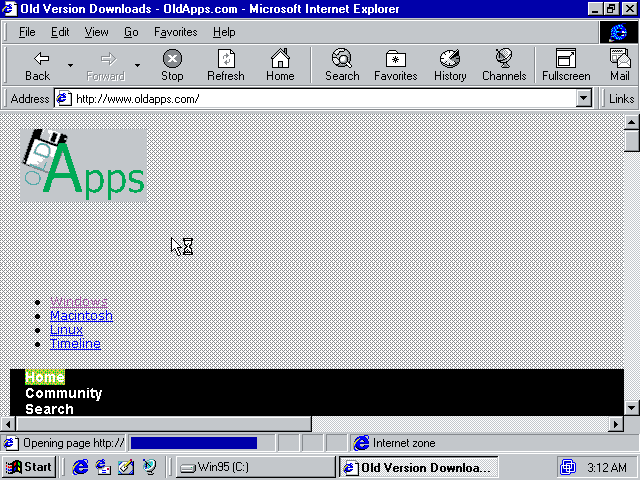
      LOL, IE3 hangs, can't render the page. Copying files to the Win95 VM is not that simple, because there are no shared folders in Win95 VM. And you can't use pendrives either, Win95 can't handle USB (at least the retail version). After downloading the application with a newer browser from oldapps, let's start Process Explorer on the test Windows 95.


      Don't try to download the Winsocks 2 patch from the official MS site, it is not there anymore, but you can download it from other sites. 

      Now let's look at the processes running:


      After staring it for minutes, turned out it is constant, no new processes appeared.
      Looking at the next screenshot, one can notice this OS was not running a lot of background processes ...


      My current Win7 has 1181 threads and 84 processes running, no wonder it is slow as hell :)

      We have at least the following options:
      1. You are lucky and not the plain Windows 95 is installed, but Windows 95 Plus! The main difference here is that Windows 95 Plus! has built-in scheduler, especially the "at" command. Just overwrite a file which is scheduled to execution, and wait. Mission accomplished!
      2. Ping of death - you can crash the machine (no BSOD, just crash) with long (over 65535 bytes) ICMP ping commands, and wait for someone to reboot it. Just don't forget to put your backdoor on the share and add it to autoexec.bat before crashing it. 
      3. If your target is a plain Windows 95, I believe you are out of luck. No at command, no named pipes, no admin share, nothing. Meybe you can try to fuzz port 137 138 139, and write an exploit for those. Might be even Ping of Death is exploitable?
      Let's do the first option, and hack Windows 95 plus!
      Look at the cool features we have by installing Win95 Plus!


      Cool new boot splash screen!


      But our main interest is the new, scheduled tasks!


      Now we can replace diskalm.exe with our backdoor executable, and wait maximum one hour to be scheduled.

      Instead of a boring text based tutorial, I created a YouTube video for you. Based on the feedbacks on my previous tutorialz, it turned out I'm way too old, and can't do interesting tutorials. That's why I analyzed the cool skiddie videoz, and found that I have to do the followings so my vidz won't suck anymore:
      • use cool black windows theme
      • put meaningless performance monitor gadgets on the sidebar
      • use a cool background, something related with hacking and skullz
      • do as many opsec fails as possible
      • instead of captions, use notepad with spelling errorz
      • there is only one rule of metal: Play it fuckin' loud!!!!

      More articles


      1. Hacker Tools For Ios
      2. How To Hack
      3. Nsa Hacker Tools
      4. Hack App
      5. Pentest Tools Windows
      6. Computer Hacker
      7. Hak5 Tools
      8. Top Pentest Tools
      9. World No 1 Hacker Software
      10. Hack App
      11. Hacking Tools Download
      12. Hack Tools
      13. Pentest Tools For Mac
      14. Hack Tools Online
      15. Pentest Recon Tools
      16. Hack Tools Online
      17. Hacker Tools Free Download
      18. Hacking Tools Windows
      19. Termux Hacking Tools 2019
      20. Pentest Tools Framework
      21. Android Hack Tools Github
      22. Hacking Tools Online
      23. How To Hack
      24. Bluetooth Hacking Tools Kali
      25. Pentest Tools Alternative
      26. Hacker Tools For Windows
      27. Best Hacking Tools 2020
      28. Hacker Tools 2020
      29. Hacking Tools Windows 10
      30. Hacker Tools For Ios
      31. Pentest Tools Github
      32. Hacker Tools Windows
      33. Easy Hack Tools
      34. Hacking App
      35. Hacking Tools Download
      36. New Hacker Tools
      37. Best Hacking Tools 2020
      38. Hack Tools For Games
      39. Pentest Automation Tools
      40. Computer Hacker
      41. Ethical Hacker Tools
      42. Hacker Tools Online
      43. How To Hack
      44. Hack Tools
      45. Easy Hack Tools
      46. Pentest Reporting Tools
      47. How To Make Hacking Tools
      48. Pentest Tools Kali Linux
      49. Hacker Tools Linux
      50. Ethical Hacker Tools
      51. Hacker Tools Windows
      52. Hacker Security Tools
      53. Pentest Tools For Ubuntu
      54. Pentest Tools Subdomain
      55. Hacker Tools For Windows
      56. Hackers Toolbox
      57. Pentest Tools Apk
      58. Pentest Tools Free
      59. Install Pentest Tools Ubuntu
      60. Pentest Tools Framework
      61. Hacker Tools Hardware
      62. Pentest Tools Kali Linux
      63. Hacking Apps
      64. Game Hacking
      65. Hacking Tools For Kali Linux
      66. Computer Hacker
      67. Best Pentesting Tools 2018
      68. Growth Hacker Tools
      69. Pentest Automation Tools
      70. Pentest Tools Review
      71. Hacker Tools Online
      72. Hacker Tools Online
      73. Hacking Tools Download
      74. Hack Tools For Games
      75. Pentest Tools
      76. Hacking Tools 2020
      77. Hacking Tools Windows
      78. Hacking Tools 2019
      79. Hacking Tools For Windows
      80. Pentest Tools Tcp Port Scanner
      81. Pentest Recon Tools
      82. Hacking Tools For Pc
      83. Hacking Tools For Windows
      84. Hacker Tools For Windows
      85. Best Pentesting Tools 2018
      86. Hacker Hardware Tools
      87. Tools For Hacker
      88. Hacker Tools Free
      89. Bluetooth Hacking Tools Kali
      90. Hack Tools Pc
      91. Hack Tools Pc
      92. Hack Tools Mac

      Security Analysis In An OpenID Connect Lab Environment

      In this post, Christian Fries shows an approach to unveil security flaws in OpenID Connect Certified implementations with well-known attack methods. One goal of the master's thesis Security Analysis of Real-Life OpenID Connect Implementations was to provide a platform for developers and security researchers to test implementations in a reproducible and maintainable OIDC lab environment.

      We included six OpenID Provider (OP) and eight Relying Party (RP) services in the lab environment. For the comprehensive security analysis, we tested the implementations against eleven Relying Party attacks and seven OpenID Provider attacks in different variations with our tool PrOfESSOS. In addition, we carried out manual tests as well. We have disclosed twelve implementation flaws and reported them to the developers in a responsible disclosure process.

      Two developer teams fixed (✔) the vulnerabilities before the deadline of the master's thesis. One Redirect URI Manipulation vulnerability was rejected (✖). This particular case can be permissible for only one registered URI for reasons of interoperability and fault tolerance. We informed three further development teams (✦).

      Name Vulnerability Fixed CVE
      MITREid Connect PKCE Downgrade Attack✦
      mod auth openidc ID Spoofing, JWKS Spoofing ✔
      node oidc-provider Redirect URI Manipulation ✖
      OidcRP Replay Attack ✦
      phpOIDC Message Flow Confusion, ID Spoofing, Key Confusion ✦
      pyoidc Replay Attack, Signature Manipulation, Token Recipient Confusion ✔ CVE-2020-26244

      We explain the method of how we have archived this result in the following sections.


      Introduction

      The OpenID Connect protocol framework defines three basic flows, Authorization Code Flow (or just Code Flow), Implicit Flow, and Hybrid Flow. OAuth 2.0, which is the foundation of OpenID Connect, introduces several extensions. One of the latest extensions is Code Flow with PKCE (Proof Key for Code Exchange, RFC7636).

      Compliance with the specification requirements is essential for application security. Settings and parameter conditions are changed. For example, in Code Flow, a nonce parameter in the Authentication Request is optional but required for the Implicit Flow. The developers have to deal with such changes. They end up implementing several code branches and various state machines. The implementation's code complexity naturally increases if it supports more features and extensions. This complexity implies that minor changes with only one specific flow in mind can introduce a security issue in another flow.

      Various well-known attacks are published in different papers and several mitigations are mentioned in best practice guides. One tool, which can perform the fully automated evaluation of services with generic attack vectors, is PrOfESSOS.

      PrOfESSOS

      PrOfESSOS is our evaluation as a Service (EaaS) security tool. We have implemented significant improvements into it over the past few years. The latest version can simulate a malicious RP that can carry out the attacks against an OP. In addition, PrOfESSOS can simulate an honest and a malicious OP to perform Single-Phase and Cross-Phase attacks. A penetration tester can access the RESTful API directly or the Web UI to start an evaluation.

      Supported attacks on Relying Parties

      Single Phase # Attack Patterns   Cross Phase # Attack Patterns
      ID Spoofing 12   Issuer Confusion 1
      Replay Attack 6   IdP Confusion 1
      Key Confusion 13   Malicious Endpoint Attack 1
      Signature Manipulation 4   Session Overwriting 2
      Cross Site Request Forgery 3      
      Token Recipient Confusion 3      
      Token Substitution 2      

      Supported attacks on OpenID Provider

      Attack # Attack Patterns
      Authorization Code Reuse and Substitution 5
      Redirect URI Manipulation 15
      Open Redirector 1
      Client Authentication Bypass 15
      Message Flow Confusion 2
      PKCE Downgrade Attack 5
      Sub Claim Spoofing 5

      The Lab Environment

      Overview

      A developer or security researcher needs a running web application to start an evaluation. One way to create an analysis is to execute the web application and evaluation tools on a local development machine. This approach might be a practical compromise for small-scale projects. For multiple instances of applications with different configurations, this approach can be cumbersome. Docker containers can help here. Various RP and OP already offer a container setup, or there are examples of creating Dockerfiles, at least. It is possible to have reproducible build results through the container concept. In addition, this approach enables us to store static configuration files and SQL dumps for a specific instance.

      We introduced three networks running on a server for our lab environment setup. The ProfNET for all evaluation tools can be controlled and debugged from a remote client. Furthermore, we added a RPNet for all Relying Parties and an OPNet for all OpenID Provider. The MitMProxy connects the networks and the users' browser. It allows us to observe and manipulate every http(s) communication in front- and back-channel.

      Setup

      Server Side

      It is only required to checkout the oidc-docker-libs. The docker-compose setup can be built and run with:

      git clone https://github.com/RUB-NDS/oidc-docker-libs docker-compose build docker-compose up -d 

      The following ports are used by the lab: 8787, 9990, 8888, 8042, 8080, 8081. You should ensure that you don't have service running on those ports.

      The docker-compose provides the possibility to run only a small subset, for example:

      docker-compose up -d professos mitmproxy mitreid-server 

      Docker Structure

      The basic idea of our docker containers is to build from sources in a more or less generic way. We intended that each application runs as a completely independent unit. The application configuration can be performed with build arguments, environment variables, or complete SQL dumps.

      You can see that we structured a Dockerfile in four blocks:

      FROM ubuntu:18.04  ARG BRANCH=v3 ARG FLOW=implicit ARG CONTROLLER_URL ARG SERVER_HOST  # Setup the application ENV APPDIR /opt/app WORKDIR ${APPDIR} RUN git clone --depth=1 --branch=$BRANCH https://github.com/YOU/YOUR_APP RUN cd YOUR_APP \     && echo config=$FLOW >> configuration_file \     && ./build  # deploy automatically created certs ARG CA_DIR="/certs" ARG CA_CERT="oidc-ca.crt" VOLUME ["$CA_DIR"]  # Configure apache or nginx COPY config/apache-ssl.conf /etc/apache2/sites-available/ssl.conf RUN sed -i "s#SERVER_HOST#$SERVER_HOST#g" /etc/apache2/sites-available/ssl.conf RUN a2enmod headers ssl proxy proxy_http rewrite && a2ensite ssl RUN echo "https://$CONTROLLER_URL" > /var/www/html/.professos  # Start the application and apache/nginx server COPY docker-entrypoint.sh ${SUBDIR}/ WORKDIR ${SUBDIR} ENTRYPOINT ["./docker-entrypoint.sh"] 

      From this point, it is possible to add two or more configured instances to the docker-compose.yml file. Every instance can be tested independently and without influencing each other. This independence enables us to test various switches, e.g., different flows or authentication methods in different combinations.

      app1-implicit:     build:       context: rp/app1       args:         FLOW: "implicit"         CONTROLLER_URL: ${CONTROLLER_HOST}         CLIENT_HOST: ${APP1-IMPLICIT}     depends_on:       - certs     volumes:       - certs:/certs:ro     env_file:       - .proxy_env     environment:       CA_DIR: ${CA_DIR}       CA_CERT: ${CA_CERT}       VIRTUAL_HOST: ${APP1-IMPLICIT}     networks:       - rpnet       - profnet 
      app1-code:   build:     context: rp/app1     args:       FLOW: "code"           CONTROLLER_URL: ${CONTROLLER_HOST}       CLIENT_HOST: ${APP1-CODE}   depends_on:     - certs   volumes:     - certs:/certs:ro   env_file:     - .proxy_env   environment:     CA_DIR: ${CA_DIR}     CA_CERT: ${CA_CERT}     VIRTUAL_HOST: ${APP1-CODE}   networks:     - rpnet     - profnet 

      Client Side

      The user solely has to establish a proxy connection to SERVERIP:8080. For example, in Firefox, the addon FoxyProxy can switch easily between different proxy settings.

      It is advisable to install the generated Root-CA (oidc-ca.crt) in the browsers' certification store. Otherwise, self-signed certification warnings will be displayed. After the web browser is connected to the proxy, it should be possible to reach the landing page https://lab.

      Automatic Tests with PrOfESSOS

      We have two options for automatic tests with PrOfESSOS. We can either use the Web UI at https://professos, or call the RESTful API methods directly. Both options require a configuration file with target information. PrOfESSOS requires this information to find all needed URLs and parameter fields to login with selenium scripts.

      You can use the following JSON file for the MITREid Connect Client:

      {   "UrlClientTarget": "https://mitreid-client/simple-web-app/login",   "InputFieldName": "identifier",   "SeleniumScript": "",   "FinalValidUrl": "https://mitreid-client/simple-web-app/",   "HonestUserNeedle": "{sub=honest-op-test-subject, iss=https://honest-idp.professos/CHANGE_ME}",   "EvilUserNeedle": "{sub=evil-op-test-subject, iss=https://attack-idp.professos/CHANGE_ME}",   "ProfileUrl": "https://mitreid-client/simple-web-app/user" } 

      Only the CHANGE_ME parameter must be replaced manually with the displayed Test ID, as you can see in the following screenshot. The Test ID represents a unique OP address. This allows parallel testing as long as the implementation supports Dynamic Registration.

      After clicking the "Learn" button, PrOfESSOS tries to log in with the honest and evil OP. Note that it takes a while until the process is finished.

      If everything has worked as expected, PrOfESSOS displays a green checkmark. Otherwise, the UI provides minor logs and a few screenshots until the error has occurred. The MitMProxy Web UI can be a helpful additional tool to debug such issues.

      On success, explicit tests or all tests can be executed. Each test step provides a small description and a test execution log.

      The other option to start these tests is to use the RESTful API. Therefore, we provide a python cli tool in the oidc-docker-libs/oidc-lab-scripts folder. For all currently implemented RP and OP solutions, we have stored the json configurations. After starting the cli tool you solely need to select a target and run a complete test. An HTML report is also created which can be shared with collaborators.

      #> ./cli.py [*] Professos CLI started Starting Control Center for Professos! cli> load rp mitreid-client  Start session default cli>> rp> mitreid-client> full_test Create new test plan: TestId = 6RZmcJHNd6o Learn: {     "HonestWebfingerResourceId": "https://honest-idp.professos/6RZmcJHNd6o",     "EvilWebfingerResourceId": "https://attack-idp.professos/6RZmcJHNd6o",     "UrlClientTarget": "https://mitreid-client/simple-web-app/login",     "InputFieldName": null,     "SeleniumScript": "",     "FinalValidUrl": "https://mitreid-client/simple-web-app",     "HonestUserNeedle": "{sub=honest-op-test-subject, iss=https://honest-idp.professos/6RZmcJHNd6o}",     "EvilUserNeedle": "{sub=evil-op-test-subject, iss=https://attack-idp.professos/6RZmcJHNd6o}",     "ProfileUrl": "https://mitreid-client/simple-web-app/user",     "Type": "de.rub.nds.oidc.test_model.TestRPConfigType" } ================================================================================ Run Test Step [0]: ID Spoofing 1 - ID Token (sub) - PASS ================================================================================ Run Test Step [1]: ID Spoofing 2 - ID Token (sub+iss) - PASS ================================================================================ 

      Semi-Automated and Manual Tests

      The MitMProxy can intercept and manipulate front and backend communication for minor manual tests. For example, the MITREid Connect client can perform user authentication with Keycloak as the OpenID provider. To simulate a redirect URI attack, you can intercept the Authentication Request or Token Request and manipulate the values.

      Another reproducible way is to combine a specific PrOfESSOS attack, and a prepared script that is uploaded to the MitM scripting interface. Therefore, we added a server application to the MitM scripting interface, which can be controlled with the lab script cli tool.

      We used such a workflow to check if a special redirect URI is vulnerable to an XSS attack. You can try it on your own. The command to prepare this attack is:

      ./cli.py [*] Professos CLI started Starting Control Center for Professos! cli> load op mitreid-server  Start session default cli>> op> mitreid-server> create Create new test plan: TestId = vWmdL4XHe2w cli>> op> mitreid-server> learn Learn: {     "HonestRpResourceId": "https://rp.professos/vWmdL4XHe2w",     "EvilRpResourceId": "https://evilrp.professos/vWmdL4XHe2w",     "UrlOPTarget": "https://mitreid-server/oidc-server",     "OPMetadata": "",     "AccessToken1": "",     "AccessToken2": "",     "User1Name": "user1",     "User2Name": "user2",     "User1Pass": "user1pass",     "User2Pass": "user2pass",     "LoginScript": "",     "ConsentScript": "",     "Client1Config": "",     "Client2Config": "",     "Type": "de.rub.nds.oidc.test_model.TestOPConfigType" } cli>> op> mitreid-server> run_pyscript pentest/mitreid-server-redirect.py Received: OK Received: OK cli>> op> mitreid-server> run 48 ================================================================================ Run Test Step [48]: Custom 1 - Redirect URI - PASS cli>> op> mitreid-server> export cli>> op> mitreid-server> report 

      As a result, in the screenshot you can see that our javascript was escaped correctly.

      Another new feature for RP tests is to expose a specific attack pattern with PrOfESSOS and go through the login process manually with a browser. This is archived with the cli and the expose command. If you want to test, execute these commands:

      ./cli.py [*] Professos CLI started Starting Control Center for Professos! cli> load rp mitreid-client  Start session default cli>> rp> mitreid-client> create Create new test plan: TestId = hDOAisJy9OE cli>> rp> mitreid-client> learn Learn: {     "HonestWebfingerResourceId": "https://honest-idp.professos/hDOAisJy9OE",     "EvilWebfingerResourceId": "https://attack-idp.professos/hDOAisJy9OE",     "UrlClientTarget": "https://mitreid-client/simple-web-app/login",     "InputFieldName": null,     "SeleniumScript": "",     "FinalValidUrl": "https://mitreid-client/simple-web-app",     "HonestUserNeedle": "{sub=honest-op-test-subject, iss=https://honest-idp.professos/hDOAisJy9OE}",     "EvilUserNeedle": "{sub=evil-op-test-subject, iss=https://attack-idp.professos/hDOAisJy9OE}",     "ProfileUrl": "https://mitreid-client/simple-web-app/user",     "Type": "de.rub.nds.oidc.test_model.TestRPConfigType" } cli>> rp> mitreid-client> expose --test 3 
      • Start login at https://mitreid-client/simple-web-app/login
      • For the OpenID Provider use the exposed attacker OP address https://attack-idp.professos/CHANGE_ME which can be copied from the learn step.
      • The browser should display a simple message: Authentication Failed: Id Token Issuer is null -> Our attack was unsuccessful
      • The honest OP address can be used to compare the result with a successful login attempt.

      References

      Acknowledgement

      The master's thesis was supervised by Vladislav Mladenov, Christian Mainka, and Jörg Schwenk. Thank you for the support and opportunity to write this thesis.

      Author of this Post

      Christian Fries

      Read more

      1. Underground Hacker Sites
      2. Hacking Tools Windows 10
      3. Hacker Hardware Tools
      4. Nsa Hacker Tools
      5. Hacking Tools Pc
      6. Pentest Recon Tools
      7. Hack Tools
      8. World No 1 Hacker Software
      9. Hacking Tools And Software
      10. How To Make Hacking Tools
      11. Hacking Tools Windows
      12. Hack Tools Pc
      13. Hacking Tools Online
      14. Hack Tools Github
      15. Hack Tools Download
      16. Best Hacking Tools 2020
      17. Termux Hacking Tools 2019
      18. Hack Tools Online
      19. Hacker Tools Mac
      20. Pentest Tools Website
      21. Hacker Tools For Mac
      22. Hacking Apps
      23. Hacker Tools Github
      24. Hacker Tool Kit
      25. Hacks And Tools
      26. Tools Used For Hacking
      27. Blackhat Hacker Tools
      28. Hacking Apps
      29. Hack And Tools
      30. Hacker Tools Apk
      31. Hacker
      32. Hackrf Tools
      33. Hacker Tools Linux
      34. Hack Tools For Mac
      35. Hacker Tools Software
      36. Hacker Tools Online
      37. Hack Tools Pc
      38. Hacking Tools For Pc
      39. What Is Hacking Tools
      40. Hacker Tools For Mac
      41. Pentest Tools Port Scanner
      42. Hacker Tools Github
      43. Hack Rom Tools
      44. Easy Hack Tools
      45. Tools 4 Hack
      46. Pentest Tools Bluekeep
      47. Hacking Tools For Kali Linux
      48. Best Pentesting Tools 2018
      49. Black Hat Hacker Tools
      50. Hacking Tools Download
      51. Hack Tools For Pc
      52. Hacker
      53. Hack Tools Github
      54. Hacker Tools 2020
      55. Pentest Tools Kali Linux

      Lettori fissi

      Archivio blog